
Robocat Casino Mobile App for iOS and Android
If you love playing on the go, you do not actually need to download a separate Robocat Casino mobile app to enjoy everything on iOS or Android. The whole site is already tuned for mobile screens, quick taps and fast loading in your phone browser.
Introduction to Robocat Mobile Gaming
The full Robocat experience, from slots and live casino to sports and RoboSlot, runs smoothly in the mobile site without any extra apps.
You just open your browser, log in, and you are in the same account you use on your desktop, with the same bonuses, tournaments and cashier options.
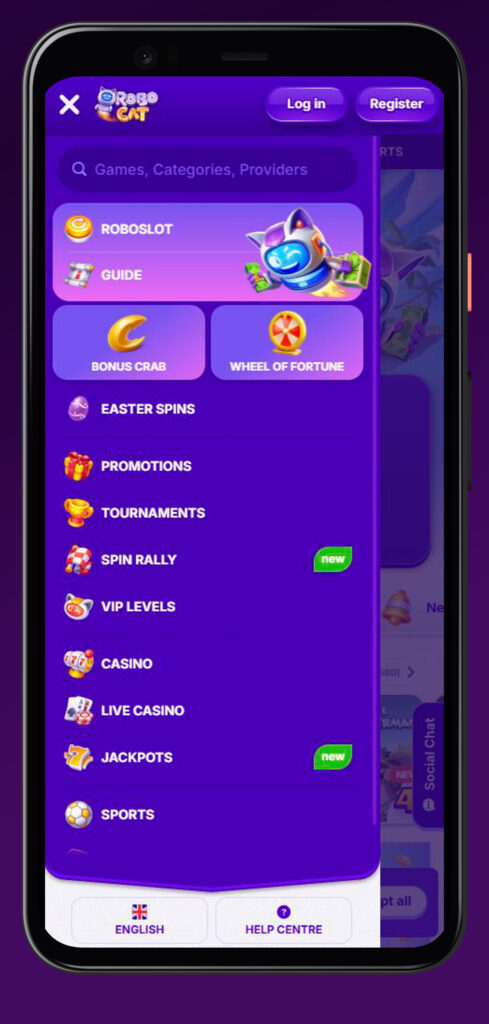
Now, the layout automatically adapts for smaller screens, so menus, search and categories are all reachable with your thumb, and you do not need to pinch and zoom. No need to install the extra Robocat app for this.
Accessing Robocat on Mobile Devices
You can reach Robocat Casino from any modern mobile browser on iOS or Android using the same URL as desktop, and all navigation is optimised for touch.
If you want it to feel like a native Robocat app, you can simply add a shortcut icon to your home screen and launch it with one tap.
Mobile Browser Access
You can use Safari, Chrome or any other modern browser to open Robocat, and the responsive design takes care of the rest.
What you get in the mobile browser without the Robocat Casino application:
- Full access to Casino, Live Casino, Jackpots and Sports from the main menu and footer shortcuts.
- Same search bar for games, categories and providers at the top of the screen.
- Access to Help Centre, Guide, Payments and Promotions pages right from the footer.
Honestly, for most players, the browser version does everything a dedicated Robocat Casino app would do, only without eating storage on your phone.
Creating a Shortcut on Your Device
Now, if you want Robocat to sit on your home screen like a real app, there is a dedicated “Create Shortcut” guide in the footer.
You will find it under General Info as “Create Shortcut”, right next to the Guide and Help Centre links.
Typical shortcut steps (summarised):
- Open Robocat in your mobile browser and log in to your account.
- Use your browser’s “Add to Home Screen” function to add Robocat Casino (works on both iOS and Android).
- You will then see a Robocat icon on your home screen that opens directly to the casino with one tap.
Big plus, this trick gives you an “app-like” experience of Robocat without needing to mess with stores or updates.
Mobile Registration and Login
You can register and log in on mobile just as easily as on desktop, because all main buttons are fixed at the top and bottom of the screen for quick access.
Your account is fully cross-platform, which means anything you do on your phone instantly syncs with your desktop session and vice versa.
Creating Your Mobile Account
Let’s dig into signing up first. On mobile, the “Register” button is always visible in the header, so you can start the process from any page.
What you will typically do on mobile without downloading the Robocat Casino application:
- Tap “Register”, fill in your email, password, personal details and confirm that you are over 18.
- Accept the Terms and Conditions, including rules about bonuses, withdrawals and responsible gaming.
- Verify your email and later your identity through KYC when you head to bigger withdrawals.
If you prefer starting on your phone, you can complete everything there and then log in on your desktop later with the same credentials.
Quick Login Options + PlayID
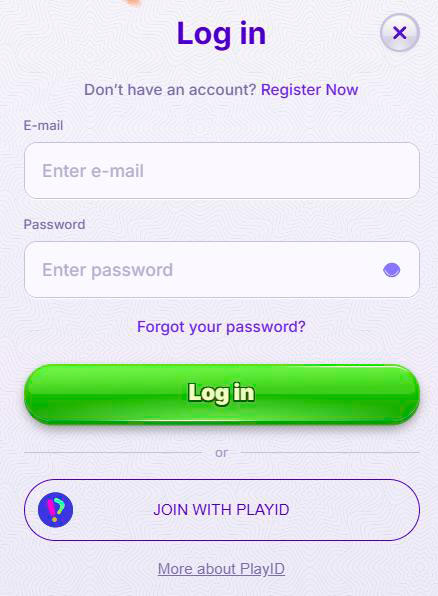
Once your account is live, login is one tap away via the “Log in” button, which stays in the header on mobile.
On top of that, Robocat supports quick access tools like live chat and guide pages, which can help you recover access if you ever get stuck.
How fast does login work in practice?
- The login form is mobile-friendly, so you can easily enter your email and password with one hand.
- You can keep your browser logged in, so relaunching from a home screen shortcut drops you straight back into your games.
- Support links to Help Centre and Live Chat are in the footer and make it simple to solve access issues without switching to a desktop.
If your device supports biometric autofill, you can pair that with the browser login for a near-instant Robocat launch every time.
Mobile Games Selection at Robocat
You are not getting a cut-down version of Robocat on mobile; the game hall, live casino and sports are all accessible with the same category filters.
The footer and main navigation let you jump between Casino, Live Casino, Jackpots and Sports with just a couple of taps.
Casino Games on Mobile
Robocat Casino’s slots and RNG table games adapt nicely to portrait mode, and you can browse by category or type directly from the mobile footer.
Main casino categories on mobile
- Top, New, Popular and Exclusive games for when you just want to see what is hot.
- Megaways, Bonus Buys, Slots, Table Games and Instant Games are separate sections.
- All Games overview, if you want to scroll through the full catalogue and use the search for specific titles or providers.
So whether you are spinning for a few minutes in a queue or grinding Megaways in bed, the mobile casino lobby keeps navigation simple.
Live Casino on Mobile
Live dealer tables are fully available on mobile, with optimised video players and simple betting interfaces for smaller screens.
Live casino sections you will see:
- Top Live Casino Games and Gold Saloon for featured tables and rooms.
- Roulette, Blackjack, Baccarat, Dice, Poker and International tables for classic choices.
- Game Shows, plus a generic “All Live Casino Games” view when you want to browse everything.
If you enjoy streaming-style games, launching a show on your phone works just as smoothly as on a desktop, thanks to the responsive design.
Sports Betting on Mobile
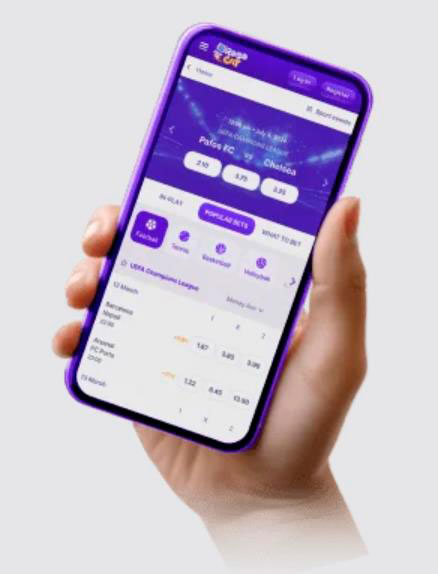
Now, the sportsbook and live betting areas are also mobile-friendly and accessible from the footer under Sports, Live Betting and Virtual Sports.
All main leagues and markets, including football, tennis, basketball, ice hockey and more, are listed with their own quick links.
Sports options on your phone
- Dedicated Sportsbook page with filters by sport and competition.
- The live betting section shows in-play events in a simplified mobile layout.
- The Virtual Sports tab offers quick fixed schedule simulations when you want fast results.
If you like to place bets while watching a match, the mobile layout aims to keep markets readable and easy to confirm with your thumb.
Mobile Payment Methods
You have access to the same payment methods on mobile as you do on desktop, since the cashier runs in a secure embedded page.
Supported options shown in the payments list include Visa, Mastercard, Interac and more, plus an extra “More” link for the full list.
Making Deposits on Mobile
Deposits on your phone are handled through the same cashier module, launched from the main interface with a single tap.
How mobile deposits usually work
- Open the cashier, pick one of the available methods like Visa, Mastercard or Interac.
- Enter the amount in euros and your payment details in the secure form.
- Confirm the transaction, and funds should appear almost instantly in your balance so you can start playing.
Big plus, the payments page is fully responsive, so you do not have to fight with zoom or hidden fields when you are topping up on Robocat Casino.
Mobile Withdrawals
Withdrawals are requested from the same mobile cashier, with all standard limits and verification requirements applied.
Things to keep in mind on Robocat Casino mobile:
- You will usually be paid back to the same method you deposited with, where possible.
- All withdrawals are processed under the standard rules and monthly limits, and may require KYC if not already completed.
- You can still track pending withdrawals and limits from your phone without needing to log in on a computer.
If you prefer to keep everything mobile first, you can comfortably manage deposits, withdrawals and account verification right from your handset.
Conclusion
Bottom line, Robocat Casino does not lock anything behind a separate iOS or Android app, because the whole platform is built to work as a full-featured mobile site with shortcuts instead.
Whether you want casino, live tables, sports or RoboSlot, you can access it all in a couple of taps without the Robocat Casino app, fund your account and play without leaving your browser.
FAQ
No, there is no separate native Robocat Casino app; you simply use the mobile browser version, which is optimised for iOS and Android and gives you full functionality.
Use your browser’s “Add to Home Screen” feature, and you can also check the “Create Shortcut” page under General Info in the footer for step-by-step instructions.
Yes, you can access Top, New, Popular, Exclusive, Megaways, Slots, Table Games, Instant Games and more from the mobile Casino menu.
Absolutely, Robocat mobile Live Casino includes roulette, blackjack, baccarat, game shows, poker and international tables, all optimised for small screens.
Yes, you get Sportsbook, Live Betting and Virtual Sports pages on mobile, with quick links to major sports like football, tennis and basketball. You don’t need the Robocat APK for this.
You can deposit and withdraw with the same methods shown on desktop, including Visa, Mastercard, Interac and others listed on the Payments page.
Yes, Robocat only accepts customers over 18 and clearly reminds you to play responsibly in the footer across all versions, including mobile.